🚚 Free Worldwide Shipping on All Orders!Shop Now

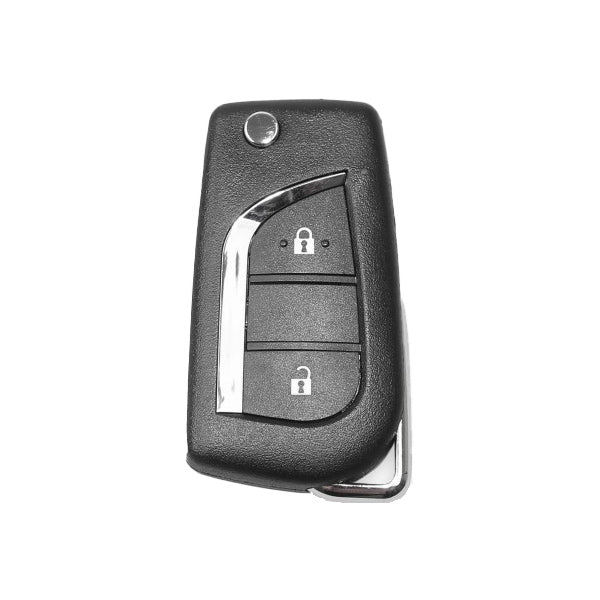
Toyota Style XKTO01EN / 2-Button Universal Remote Key for VVDI Key Tool (Wired)
- Model: XKTO01EN
- Manufacturer: Xhorse
- Compatible Programming Tool VVDI Key Tool
- Required Battery CR2032
- Open remote and remove the battery
- Connect the data cable to the white connector on remote PCB board and plug into VVDI Key Tool
- Using the VVDI Key Tool, select Product Remote and select the remote you would like to generate
- Disconnect cable, reinsert battery and reassemble remote. Install proper chip and blade for your application.
- Program remote to the vehicle as you would an OEM remote
$3.41
Original: $9.73
-65%Toyota Style XKTO01EN / 2-Button Universal Remote Key for VVDI Key Tool (Wired)—
$9.73
$3.41Product Information
Product Information
Shipping & Returns
Shipping & Returns
Description
- Model: XKTO01EN
- Manufacturer: Xhorse
- Compatible Programming Tool VVDI Key Tool
- Required Battery CR2032
- Open remote and remove the battery
- Connect the data cable to the white connector on remote PCB board and plug into VVDI Key Tool
- Using the VVDI Key Tool, select Product Remote and select the remote you would like to generate
- Disconnect cable, reinsert battery and reassemble remote. Install proper chip and blade for your application.
- Program remote to the vehicle as you would an OEM remote